Jardín Digital
I stopped re-recording my product videos. One script now speaks 11 languages.
How I render the product videos for AI Summary Helper from a scripted demo build instead of recording them, with narration, subtitles and publishing for 11 languages coming out of one TypeScript file.

Every feature of AI Summary Helper needs a short video. Every language multiplies that work. Record, edit, subtitle, voice, export, publish, times eleven. By the third language I knew I would stop shipping features, or stop making videos.
So I stopped recording. Here is the setup I ended up with, how Claude fits into it, and the three things that broke along the way.
Watch the videos on the product site
1. Don't record the screen. Drive the real interface.
The extension has a demo build: the real popup, running inside a page, with a fake browser API that replays recorded content. No network, no API key, nothing random.
The videos are rendered from that demo with a virtual clock. Nothing streams until the renderer says "advance 33 ms". So every frame is reproducible, and a clip is a script: click here at 900 ms, type this at 5.8 s, scroll that. Change a word, render again. No new take.
2. Put the words in code, not in a timeline.
Each clip is one entry in a TypeScript file: the hook, the narrator's text, the subtitles, and the steps the cursor takes. German is my reference wording. Every other language is written from the English meaning, with the register of its market (formal "vous" in French, plain "你" in Chinese, and so on).
A small check script tells me what is missing or wrong for a language before I render. It prints a tick or a list.
3. One text, one voice, one source of truth.
The narration is generated from exactly the text that is also the subtitle, so sound and captions cannot drift apart. The audio gives word timings, the captions follow them, and a clip stretches itself when a language needs more time (Japanese and French did today).
The narrator is a male text-to-speech voice with a light Dutch accent. That is a deliberate brand choice, and it comes with a quirk: if a German hook starts with a word that is also Dutch, the model reads the whole line as Dutch. So German hooks have to open with unmistakably German words. I found out by listening.
4. Publishing is part of the pipeline.
A render is not done when the file exists. The same run also:
- crops a web version, makes a poster frame and exports subtitles (WebVTT) from the word timings,
- writes a manifest with duration and transcript, which becomes video markup for search engines and a video sitemap,
- lets every translated page pick up its own language version of the video,
- writes a briefing per clip and language: post text, hashtags, which communities fit.
The website itself is translated into 24 languages by a CI job: change an English sentence, and a pull request with the translations appears a few minutes later. Unchanged sentences keep their wording because the previous result is cached.
Today three new clips went out in six languages on the same day: rendered, checked, exported and live.
5. One person, a few hours a week, and Claude with a recipe book.
I am a solo developer. There is no video team, no localization agency and no designer on call, just a small number of hours and a product that needs to speak many languages. This only works because I can hand most of the repetitive work to Claude Code. And what makes that work is less about clever prompts than about what the project tells the model about itself.
Here is what I mean by recipes:
- Skills for the tool I don't know by heart. The video project has the open-source Remotion skills installed: twelve of them, covering best practices, captions, rendering and the docs. Before Claude touches a composition it reads how Remotion wants it done, so I don't explain a rendering library in every session.
- A contract instead of a prompt. The demo's README lists every URL parameter and automation hook: the virtual clock, the scenarios, which screen to open. A second README says which files you need to add one more language. A new scenario or a new language is "follow the README", for me or for Claude.
- Rules written down once. A content plan sits next to the code with the rules for every clip, like "no claim the extension cannot keep" and "check every source in the registry". A new session starts from the same rules as the last one.
- Checks the model cannot talk its way past. The language check script, the ffmpeg frame test and the DOI lookups decide whether something is done. Not my impression of the output, and not the model's.
The extension, the demo build and the website are open source in philffm/ai-summary-helper, and the automation contract lives in plugin/demo. The Remotion project itself is a separate folder next to that repo and is not published yet.
If you are one person with a product in many markets, this is the trade I would make again: spend your time once on the contract and the checks, and let the machine repeat the rest.
What broke
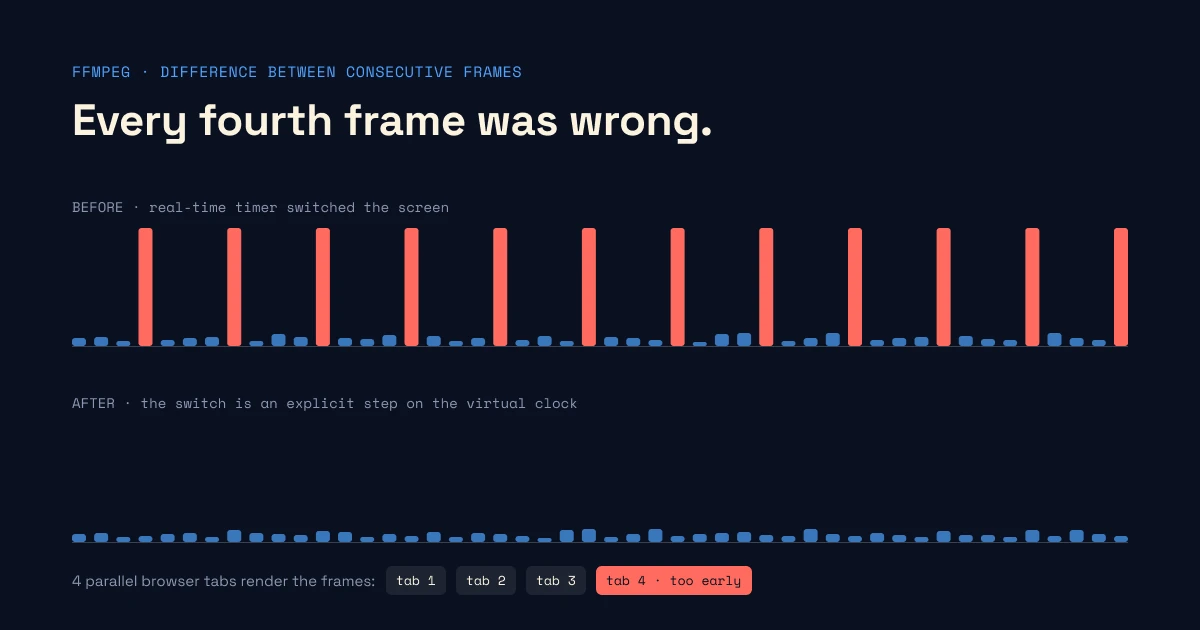
Every fourth frame was wrong. One clip flickered, but only in the final render. I measured the difference between consecutive frames with ffmpeg and found a perfect pattern: every fourth frame showed a different screen. The renderer uses four parallel browser tabs, and one of them captured the frame before the demo had switched to the right screen, because that step was driven by a real-time timer, not the virtual clock. Fix: make it an explicit step. I now run the same measurement on every new clip, and it takes seconds.
The narrator read German as Dutch. See above.
An AI-written draft had wrong sources. For clips that open with a research fact, an early draft contained two DOIs that pointed to the wrong papers, and two papers that did not support the claim. I looked every DOI up in the registry, fixed the claims, and now treat "a model wrote it" as a reason to check, not a reason to trust.
What I would tell someone starting
- Make the product renderable by script first. Everything else follows from that.
- Keep the words in one file, with one reference language. Translation is then a table, not a project.
- Measure, don't squint. Flicker, loudness, caption timing, missing strings: if a script can check it, a script should.
- Automation does not replace native readers. It gets you to a complete, consistent draft in every language. The last step, someone who lives in that language saying "no one says it like that", I have not automated.
If you read Japanese, Chinese, French or Spanish, you can tell me where my videos sound wrong. They are on the site, free to watch: https://ai-summary-helper.byphil.eu/blog/videos.html